
Profit Agent: Working with Klaviyo
At a glance: The Profit Agent turns your Lifetimely data into customer groups in Klaviyo, then helps you build automated flows for those groups. You ask in chat, the agent shows a card describing what it will do, and nothing changes in Klaviyo until you approve it.
The pieces connect like this:
Profit Audience → Klaviyo list → Flow → emails and SMS
How the pieces fit
A few plain-language definitions first, because the words matter:
- Profit Audience is a group of customers the Profit Agent builds from your Lifetimely data. Only the agent creates them. You describe who you want in plain words and the agent writes the rule. You can't edit the rule afterwards, you make a new audience instead.
- Auto-updating audience refreshes once a day, so people join and leave as your data changes. One-time audience is filled once and never refreshed.
- Klaviyo list is a fixed group of people in Klaviyo. Every Profit Audience has a matching Klaviyo list that Lifetimely keeps up to date.
- Klaviyo segment is a group Klaviyo works out for itself from a rule. The agent can create one of these too if you ask for it by name.
- Flow is an automated series of steps in Klaviyo (a wait, an email, an SMS, or a branch) that starts from a trigger, such as someone joining a list.
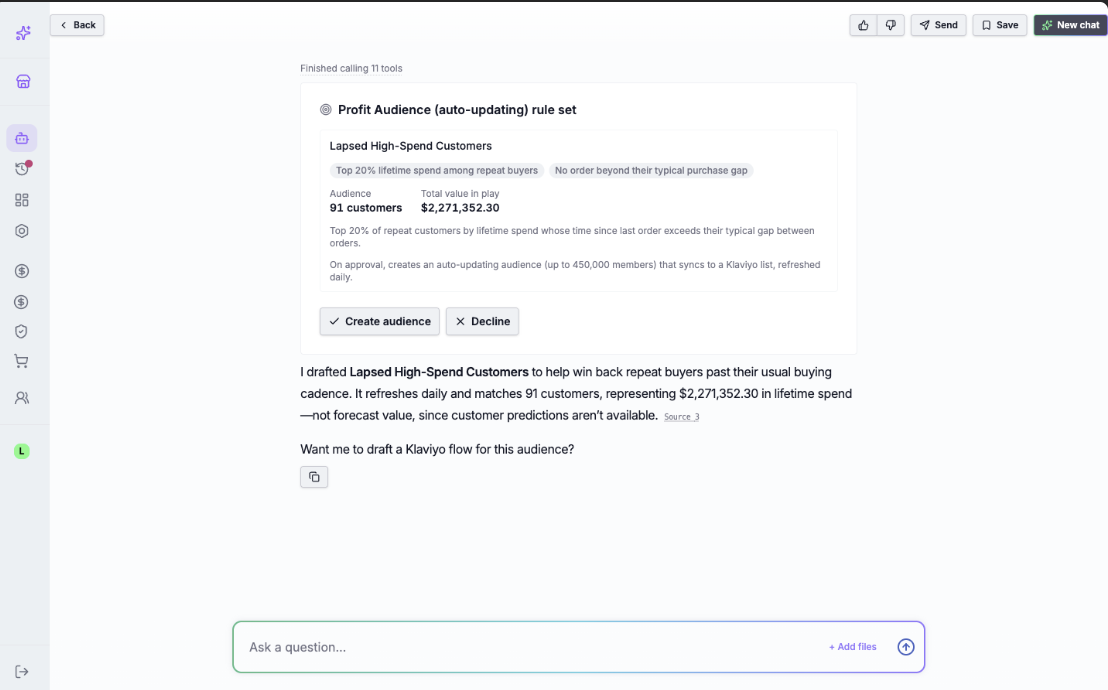
- Proposal card is the card the agent shows before it changes anything. You approve or decline it.
Here is how an audience, a list, and a segment differ:
|
|
Profit Audience | Klaviyo list | Klaviyo segment |
|---|---|---|---|
| Who decides who's in it | Lifetimely, from your data | Nobody, it's a fixed list | Klaviyo, from its rule |
| Where it lives | Lifetimely, with a matching Klaviyo list | Klaviyo | Klaviyo |
| Who creates it | The Profit Agent | Made automatically for each audience | The Profit Agent, when you ask for a segment |
| Can you edit it | No, archive it and make a new one | You can, but Lifetimely overwrites your changes | You can turn it off and on from the chat |
The agent prefers audiences, because Lifetimely manages them for you: it keeps the rule, refreshes it daily, keeps a history of every run, and pauses it if something looks wrong. A Klaviyo segment is only a rule set in Klaviyo. You can still ask for one when you want Klaviyo to own the rule.
Nothing happens until you approve. You ask the agent for something, it shows a card describing what it will do, and you approve or decline. Most cards show an Undo button after they run.
Note: your Lifetimely integrations page has a separate setting called Klaviyo Manage, which brings up to 25 lists and 25 segments from Klaviyo into your Lifetimely reports. That works the other way round and is a different feature from what's described here.
Connecting Klaviyo
You connect Klaviyo straight from the chat.
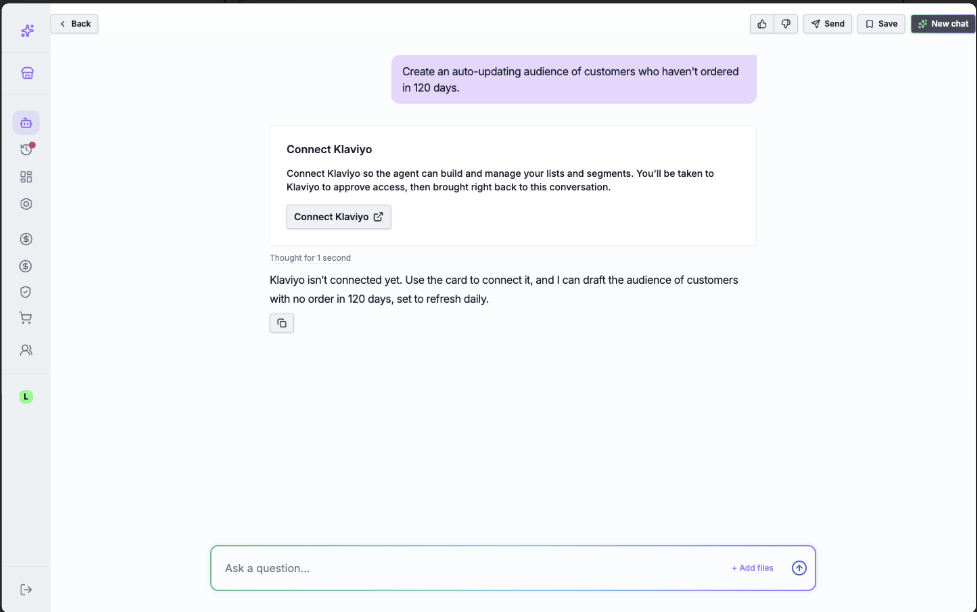
- Ask the agent for something that needs Klaviyo, such as creating an audience. If Klaviyo isn't connected, the agent shows a Connect Klaviyo card.
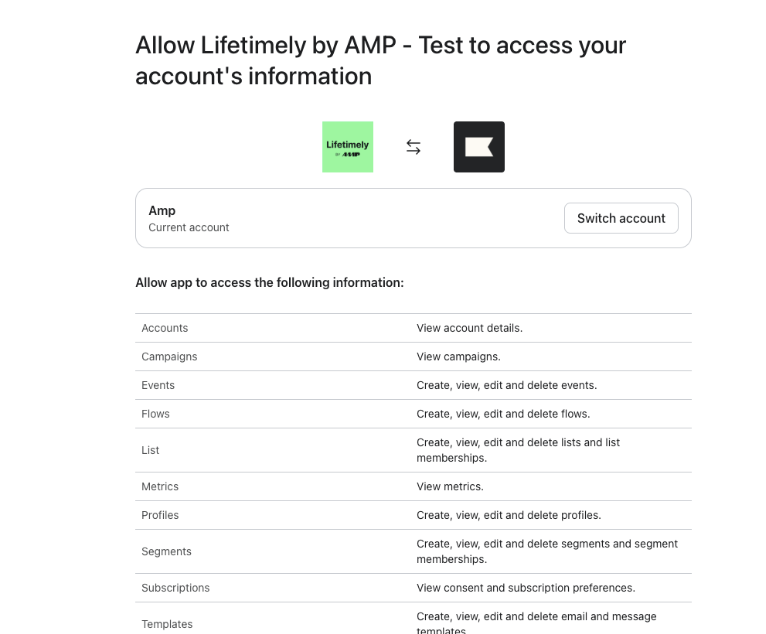
- Click Connect Klaviyo. You go to Klaviyo, choose your account, review the permissions, and click Allow.
- Klaviyo sends you back to the same conversation and the agent carries on with what you asked.
If you decline in Klaviyo, you land back on the Profit Agent with a message saying no changes were made. Connect again whenever you're ready.
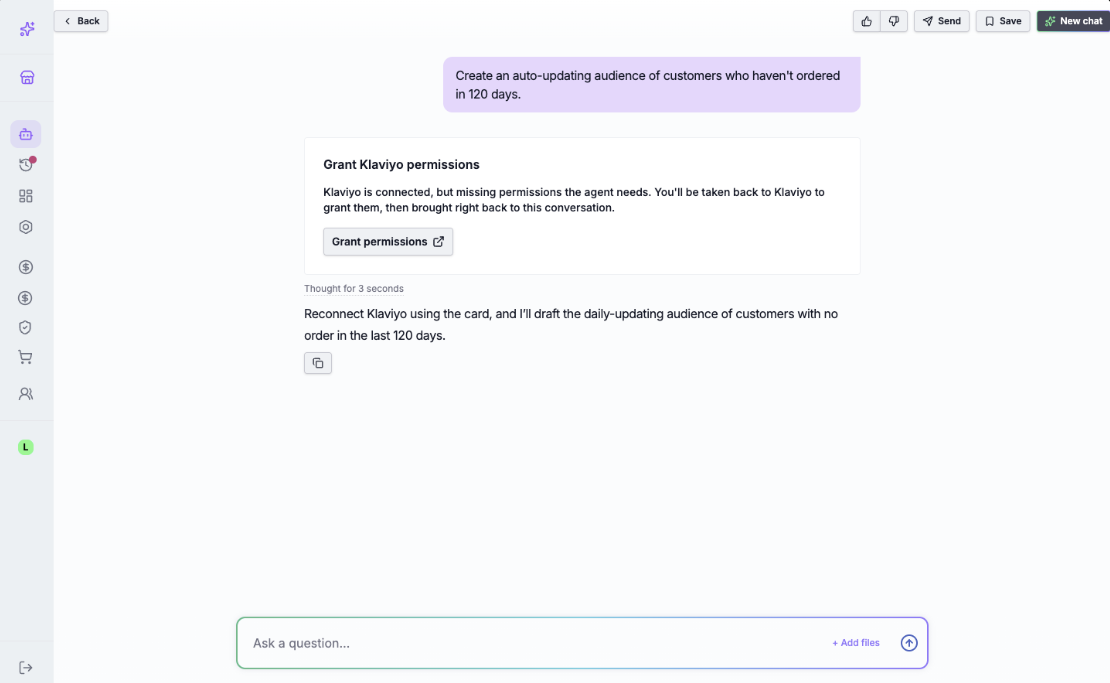
Older connections may be missing a permission. If you connected Klaviyo before a newer feature existed, the agent may need a permission you haven't granted yet. When that happens it shows a Grant Klaviyo permissions card instead of carrying on. Click Grant permissions, which works the same way as connecting, and you come back to the same conversation.
Two Klaviyo settings can block a flow's emails (both are set in Klaviyo, not Lifetimely):
- A verified sender email. A flow with an email step needs one. In Klaviyo go to Settings, then Email, then Sender information, and add and verify a sender.
- A branded sending domain. Klaviyo shows a warning on email steps if your account doesn't have one.
Profit Audiences
A Profit Audience is a group of customers the agent builds from your Lifetimely data, with a matching Klaviyo list you can point a flow at. There are two kinds:
- Auto-updating refreshes once a day. People join and leave as your data changes.
- One-time is filled once and never refreshed.
There's no form to fill in. You describe who you want ("customers who spent over 200 in the last 90 days", "first-time buyers from last month") and the agent writes the rule, shows you a card, and creates the audience once you approve.
Everything the agent builds is listed on the Retention Marketing page in Lifetimely, with tabs for your auto-updating audiences, one-time audiences, Klaviyo lists and Klaviyo segments. In Klaviyo, each audience's matching list is named after the audience with a suffix such as "[Profit Audience, auto-updating]", and you can open it from the audience's page using the Source link.
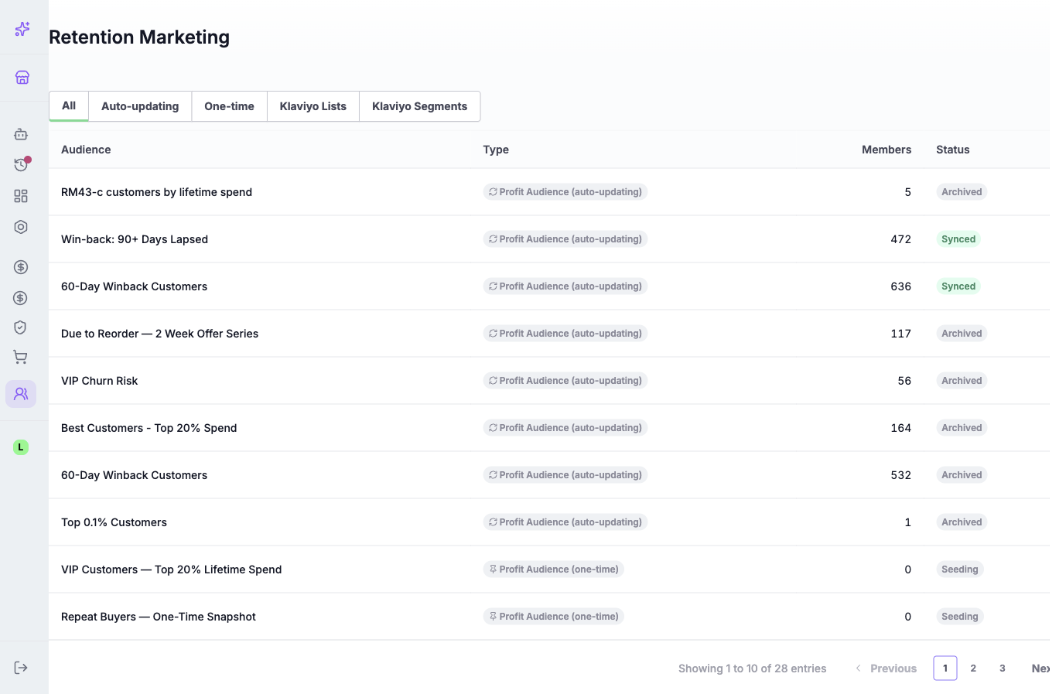
To change an audience, archive it and make a new one. You can't edit the rule on an existing audience. Archiving stops it syncing and also deletes its matching Klaviyo list, so any flow pointed at that list stops receiving new people.
Limits worth knowing:
- Up to 1,000 auto-updating audiences per store. One-time audiences don't count towards this.
- Up to 2,500,000 customers across all of a store's auto-updating audiences.
- Up to 450,000 customers in a single audience. If a rule matches more than that, the audience keeps the highest-value customers on the measure it ranks by, such as spend.
Why an audience sometimes pauses
An auto-updating audience pauses when a daily refresh would change too much at once. This is a safety feature: it protects your Klaviyo list, and any flow using it, from a sudden swing.
When an audience pauses, the refresh that looked wrong is not applied, your Klaviyo list is left exactly as it was, and your flows keep running on the existing list. The run shows as Paused in the audience's run history.
A refresh pauses if a single day's change is very large (for example, it would remove more than about a third of the audience, or swing more than half of it, or empty it entirely). The first fill of a new audience is never checked, and one-time audiences are never checked.
What to do: open the audience and look at its run history. If the big change was a one-off glitch, the next good refresh syncs normally. If it's a real change (a sale, a big import, a data correction), the audience syncs again once the new result holds steady from one day to the next. There's no manual override, and you don't need to do anything to restart it.
Klaviyo segments
A Klaviyo segment is a group Klaviyo works out for itself from a rule. The agent defaults to a Profit Audience, because Lifetimely manages audiences for you, but you can ask for a segment when you'd rather Klaviyo own the rule.
Ask for it by name, for example: "Create a Klaviyo segment (not a Profit Audience) of customers who placed 3 or more orders in the last 365 days." The agent shows a card with the name, the rule, and roughly how many customers match. Segment names start with [AMP], so they're easy to spot in Klaviyo.
What rules a segment can use: how many orders a customer placed or how much they spent (all time or over a number of days), plus Klaviyo's own predicted measures (average order value, lifetime value, churn risk, and similar). Predicted measures only work once Klaviyo has computed predictive analytics for your store, which needs roughly 500 customers with orders and 180 days of history. If that isn't ready, the agent builds the segment from order count or spend instead. Rules based on specific products, events, or locations aren't supported yet.
After you create it: Klaviyo fills the segment itself, so it can show 0 members for a little while at first. You'll find it in Klaviyo under Lists & segments, and on the Retention Marketing page under the Klaviyo Segments tab, where it shows as Active.
To turn a segment off, click Undo on its card and approve the "Turn off" card. This doesn't delete it, the rule is kept, and a "Turn on" card brings it back. To delete a segment completely, do it in Klaviyo.
Flows
The Profit Agent can build flows in Klaviyo for you. You describe the flow in chat, review a card, and approve it.
Every flow the agent creates is a draft. Nothing is sent until you open it in Klaviyo and turn it on.
A flow has a trigger (someone joins a Profit Audience's list, someone enters a Klaviyo segment, or an event such as Placed Order) and steps (a wait, an email, an SMS, or a branch that splits people down different paths). A branch can also act as an exit: if the rest of the flow sits inside the branch, anyone who doesn't match leaves at that point.
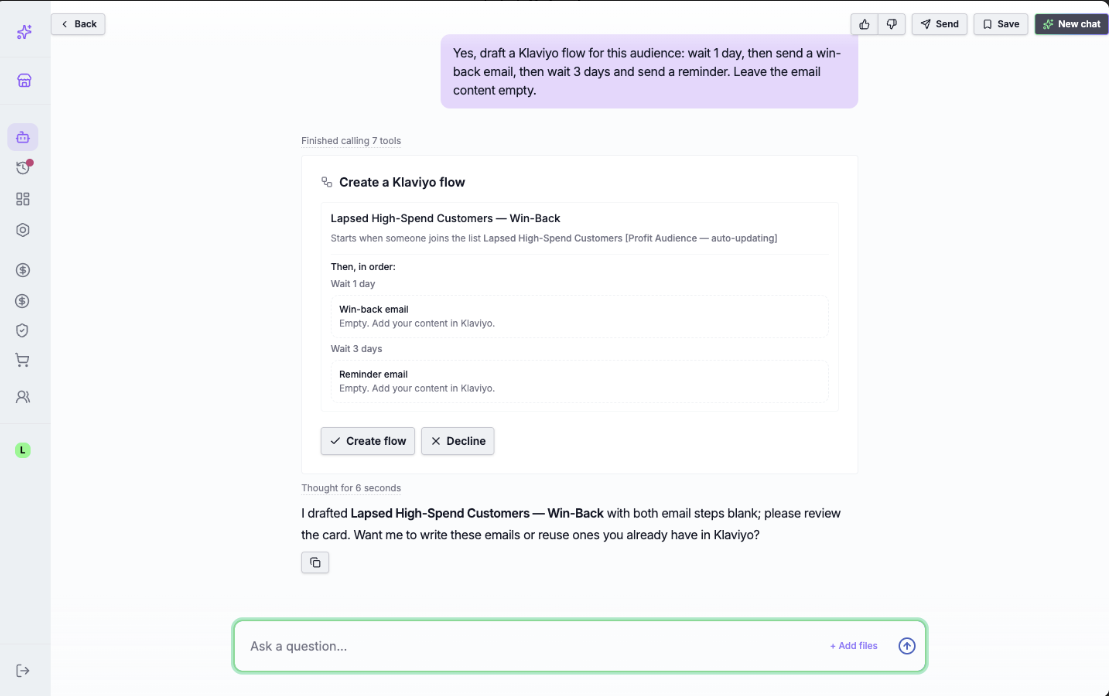
Before your first flow, make sure your Klaviyo account has a verified sender email (in Klaviyo, go to Settings, then Email, then Sender information), since flow emails won't send without one.
Emails in a flow
You have three choices for each email step, and you say which one when you ask for the flow:
- Leave it empty (the default). The step is created and you write the email in Klaviyo.
- Let the agent write it. The agent writes the subject and body and shows you a preview on the card. Emails the agent writes are HTML emails. It can't build drag-and-drop emails.
- Reuse an email you already have in Klaviyo. The agent attaches an existing template unchanged. This is how you use a drag-and-drop design in a flow the agent builds.
Changing a flow after it's created
Changes work on draft flows only. If a flow is already live, change it in Klaviyo. On a draft, the agent can change a wait, an email subject line, a branch rule, and SMS settings such as quiet hours. Each change comes on its own card for you to approve.
A few things the agent can't do: it can't rewrite an email's body or an SMS's text (if you ask, it gives you the text to paste into Klaviyo yourself), it can't add, remove or reorder steps on an existing flow, and birthday flows aren't available right now.
Ask the agent about your flows
You can also ask the agent questions about your flows in plain words. These are read-only and change nothing. For example: "What Klaviyo flows do I have, and which are live vs draft?", "Walk me through the structure of my win-back flow", or "How have my flows performed over the last 90 days?" Performance figures come from Klaviyo and show the revenue Klaviyo attributes to each flow, not profit.
> Leaving a list does not remove someone from a flow. A flow starts when someone joins its list. If they later leave the list, they stay in the flow and keep moving through its steps. If you want people to drop off when they're no longer in a list, ask the agent to add a branch that checks "is in [list]" at the point you care about. Anyone who no longer matches leaves the flow down the "everyone else" path.
If something looks off
A quick guide to the most common things you might see:
- An audience says Paused. A refresh would have changed too many customers at once, so it was held back and your Klaviyo list was left as it was. See "Why an audience sometimes pauses" above. There's no manual override.
- An audience says Failed. A refresh didn't finish. Open its run history, then check your Klaviyo connection and permissions.
- An audience says "Stopped, Klaviyo list deleted." Someone deleted the matching list in Klaviyo. Create a new audience, your history is kept.
- The Klaviyo list changed after you edited it by hand. Lifetimely overwrites the list on each refresh. Don't edit the list directly, ask the agent for a new audience instead.
- A card still says "Syncing" after a few minutes. The card doesn't refresh on its own. Reload the chat.
- A new segment shows 0 members. Klaviyo is still working it out, or nobody matches yet. Wait, then check it in Klaviyo.
- A message that Klaviyo hasn't computed predictive analytics. Your store doesn't have enough order history yet. Use a rule based on order count or spend.
- An error about a verified sender. Your Klaviyo account has no verified sender email. Add and verify one in Klaviyo under Settings, then Email, then Sender information, then try again.
- A "Connect Klaviyo" or "Grant Klaviyo permissions" card. Klaviyo isn't connected, or it's connected but missing a permission the agent needs. Click the card and follow the steps.
If you're still stuck, reach out to support and we'll take a look.
Known limitations
A few things work differently than you might expect right now. We're improving them:
- Birthday flows aren't available yet. Build one directly in Klaviyo if you need it.
- The agent writes HTML emails, not drag-and-drop designs. For a drag-and-drop email, build it in Klaviyo and ask the agent to reuse it, or leave the step empty and design it there.
- Live flows can't be changed from chat. The agent edits draft flows only. Once a flow is turned on, make changes in Klaviyo.
- A paused audience can still show a green "Live" badge at the top of its page. Check the Status column in the run history for its real state.
- Klaviyo segment cards don't link straight through to Klaviyo yet. Find the segment in Klaviyo by name, it starts with [AMP].
- After a branch change, the split's title may still show the old number. The rule itself is updated. Rename the split in Klaviyo if it matters to you.
- A single SMS change can occasionally show two cards. Approve the newer card and decline the earlier one.
FAQ
Do I build audiences and flows myself, or does the agent? You describe what you want in plain language and the agent builds it. You approve each step on a card before anything changes in Klaviyo.
I asked for a segment, but it made a Profit Audience. Why? The agent defaults to a Profit Audience because Lifetimely manages it (daily refresh, run history, safety pauses). If you specifically want a Klaviyo segment, say so by name and it will create one.
Will the agent send emails to my customers on its own? No. Every flow it builds is a draft. Nothing sends until you open the flow in Klaviyo and turn it on.
Can I edit an audience's rule? No. Archive it and create a new one. Archiving also deletes the matching Klaviyo list.
Can I edit the Klaviyo list directly? You can, but Lifetimely overwrites manual changes on the next refresh. Ask the agent for a new audience instead.
Can the agent write my emails for me? Yes. For each email step you can let the agent write it (as an HTML email), reuse an existing Klaviyo template, or leave it empty to design in Klaviyo yourself.
Can I see how my flows are performing? Yes, just ask. The figures come from Klaviyo and show the revenue Klaviyo attributes to each flow, not profit, and they update every few hours.